SpriteSheet3D
SpriteSheet3D is an object that implements continuous motion in 3D space using a Sprite Sheet containing multiple animation frames in a single image. It is useful when placing dynamic 2D animations such as explosion effects, flames, or walking characters in 3D space.
1. Understanding Sprite Sheets
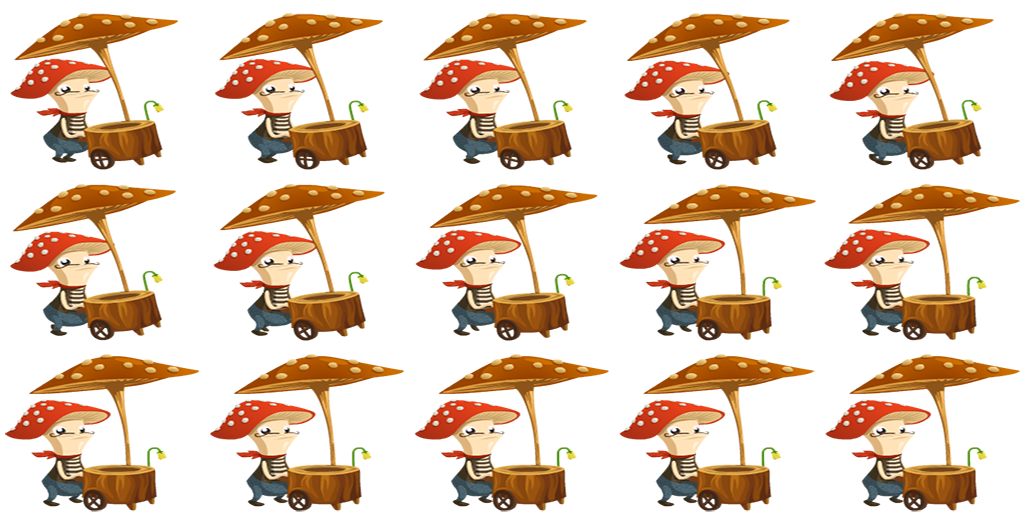
A sprite sheet is a single large texture with multiple frame images arranged in a grid. RedGPU completes the animation by dividing this texture into designated segments and displaying them sequentially frame by frame.
2. Basic Usage
To use a sprite sheet, you must first create a SpriteSheetInfo object that defines the structure of the sheet and then pass it to SpriteSheet3D.
import * as RedGPU from "https://redcamel.github.io/RedGPU/dist/index.js";

// 1. Define Sprite Sheet Info
const sheetInfo = new RedGPU.Display.SpriteSheetInfo(
    redGPUContext,
    'https://redcamel.github.io/RedGPU/examples/assets/spriteSheet/spriteSheet.png',
    5, 3, // 5 horizontal segments, 3 vertical segments
    15,   // Total frames
    0,    // Start frame index
    true, // Loop playback
    24    // Frames per second (FPS)
);

// 2. Create and Add SpriteSheet3D Instance
const spriteSheet = new RedGPU.Display.SpriteSheet3D(redGPUContext, sheetInfo);
scene.addChild(spriteSheet);
3. Key Property Control
Key properties controlling the playback state and the size of the sprite.
Animation Control
play(): Starts the animation.stop(): Pauses the animation at the current frame.gotoAndPlay(frameIndex): Moves to the specified frame and plays immediately.gotoAndStop(frameIndex): Moves to the specified frame and stops.
Billboard Settings
| Property Name | Description | Default Value |
|---|---|---|
useBillboard | Whether to always face the camera | true |
Size and Rendering Mode
SpriteSheet3D provides the same size setting options as Sprite3D.
| Property Name | Description | Default Value |
|---|---|---|
worldSize | Vertical size in world space (Unit). | 1 |
usePixelSize | Whether to use fixed pixel size mode. | false |
pixelSize | Fixed pixel size value (in px). | 0 |
// Display character animation at a fixed pixel size
spriteSheet.usePixelSize = true;
spriteSheet.pixelSize = 128;
3.3 Size Setting Policy
SpriteSheet3D shares the same size setting mechanism as Sprite3D. It supports physical size setting in 3D space through worldSize and absolute pixel size setting on the screen through usePixelSize.
For detailed differences between modes and operating principles, please refer to the Size Relationship section of the Sprite3D manual.
4. Practical Example: Walking Character Animation
See how a grid-type sheet image transforms into a natural character motion through SpriteSheet3D and Billboard settings.
Key Summary
- SpriteSheetInfo: Defines image source, sheet grid structure (Segments), animation speed (FPS), etc.
- Animation Control: Control visual flow through methods like
play,stop,gotoAndPlay. - Efficiency: Beneficial in terms of network overhead and GPU memory management by using a single sheet file instead of loading multiple images individually.
Next Steps
Learn how to construct and place three-dimensional text labels within 3D space.